If your laptop takes two full minutes to boot up, freezes when you open Chrome, and grinds away every time you save a file, you’ve probably already started looking at replacement laptops on Currys or Amazon. Stop. Before you spend £400–£800 on a new machine, there’s a small upgrade that fixes the problem on most laptops made in the last 8–10 years — and it usually costs under £100 fitted.
We’re talking about swapping your old hard drive for an SSD.
After 25 years of fixing computers in West Bromwich, this is hands-down the single best-value upgrade we recommend. Customers walk in convinced their laptop is dying and walk out with what feels like a brand new machine. Same Windows. Same files. New drive.
What’s the difference between an SSD and an HDD?
A traditional hard drive (HDD) is a mechanical device — it has spinning metal platters and a tiny arm that physically moves to read your data. It’s the same basic design from the 1950s. When your laptop is slow, that arm is the bottleneck.
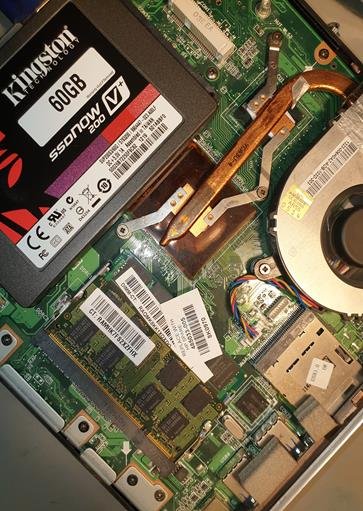
A solid state drive (SSD) has no moving parts. It’s essentially a stick of memory, like a giant USB stick but much faster. Reading and writing data happens electronically rather than mechanically, which means everything your laptop does — booting up, opening apps, saving files — happens in a fraction of the time.
The difference isn’t subtle. A typical Windows boot time on an HDD is 60–90 seconds. On an SSD it’s usually 8–15 seconds. Opening Chrome, Word, or photo editing software feels instant rather than a chore. Background tasks stop interrupting whatever you’re trying to do.
Why an SSD upgrade is the smartest fix for an old laptop
Most laptops slow down with age for one of three reasons: a clogged-up hard drive, an outdated Windows installation, or hardware that simply can’t keep up with modern software. Replacing the hard drive with an SSD solves the first reason completely and largely fixes the second too (because we usually do a clean Windows install on the new drive).
What it can’t fix: a genuinely underpowered processor or not enough RAM. But here’s the thing — the vast majority of laptops we see don’t have a processor problem. They have a hard drive problem. And the only way to know for sure is a quick diagnostic, which we offer free.
The other reason to start with an SSD upgrade is the maths. A reliable 500GB SSD costs around £40–£50. Fitting it, cloning your Windows installation (or doing a fresh install), and transferring your files takes us about an hour. The whole job typically lands between £80 and £130 depending on the drive size and how much data you need transferred. Compare that to £500 for a mid-range replacement laptop, plus the hassle of moving everything over, learning a new operating system version, and accepting that the cheaper end of new laptops actually feels slower than your upgraded old one.
Will an SSD upgrade work for my laptop?
Almost certainly, if your laptop was made in the last 10 years. Even older machines from 2012–2014 can usually be upgraded — the SATA interface that most laptops use is backwards-compatible.
Newer laptops (roughly 2018 onwards) often use a different format called M.2 NVMe, which is even faster. These are also straightforward to upgrade, though the drive itself is a different shape and the prices are slightly different.
The exceptions are some very thin ultrabooks and a handful of MacBook models where the storage is soldered to the motherboard — those can’t be upgraded without specialist board-level work. We’ll always tell you honestly if your machine falls into that category.
What about my files and Windows?
You don’t lose anything. The standard process is:
- We connect both drives to your laptop at the same time
- Clone your existing Windows installation, programs, and files onto the new SSD
- Swap the drives over
- Test that everything boots and runs properly
Your desktop looks exactly the same. Your documents are where you left them. Your bookmarks, saved passwords, and installed software all still work. The only thing that’s different is the speed.
Some customers prefer a fresh Windows install rather than a clone, which gives the machine an even cleaner start. We can do either — and we’ll talk through what makes sense for your situation.
How much does an SSD upgrade cost at Mojoo?
We keep pricing simple and transparent:
- 250GB SSD upgrade + clone + fitting: around £80
- 500GB SSD upgrade + clone + fitting: around £100
- 1TB SSD upgrade + clone + fitting: around £130
These are fitted prices, including the drive itself, professional cloning, and testing. No-fix-no-fee — if your laptop has a different problem and the SSD won’t help, we’ll tell you and there’s no charge for the diagnostic. Most jobs are completed the same day.
Book your SSD upgrade
We’re based at 4 Atlas Grove, West Bromwich, B70 9EB — a short drive from Birmingham, Smethwick, Walsall, Dudley, Oldbury and across Sandwell. By appointment, Monday to Friday 9am–6pm, Saturday 9am–12pm.
Give us a ring on 07958 468173, message us on WhatsApp, or email info@mojoo.co.uk. Bring your laptop in, we’ll take a quick look while you wait, and most of the time you’ll have it back the same day feeling like a brand new machine.
